
Odoo
Findalo for Odoo: the Findalo Search module is now on the Odoo Apps Store
· 5 min read · By Ray Rodríguez, founder of Findalo
Findalo now works on Odoo's online store. The module is called Findalo Search, it's our official module for Odoo, and since 12 November 2026 it has been published on the Odoo Apps Store, Odoo's official app store. This post covers what it does, which Odoo setups it works with, how to install it and where it doesn't reach.
Where it's published
On the Odoo Apps Store there's a Findalo Search listing for each Odoo version:
The module is free and open source (LGPL-3 license): it's plain, uncompiled Python, so you can read all of it before you install it. What you pay for is the search itself, which is a Findalo service with its own plans. Signing up is free and needs no card.
You can also download the same module from your Findalo panel, under Integration → Odoo, where you pick your Odoo version and download the matching ZIP.
Which Odoo it works with
Findalo Search is compatible with Odoo 18, 19 and 20, both Community and Enterprise, on self-hosted (on-premise) installs and on Odoo.sh. It requires Odoo's eCommerce app. If you also have the Inventory app, each product's quantities and availability are sent too.
It does not work on Odoo Online, the SaaS at odoo.com: Odoo doesn't allow third-party modules to be installed there, ours or anyone else's.
What changes in your store
You don't touch the theme. The search icon in Odoo's header now opens Findalo and, on mobile, the module adds a search icon next to the cart. From there:
- It finds products even when they're misspelled. Typos and missing accents still bring up the product.
- Filters with nothing to set up. Brand, category, price and attributes come straight from the catalog. Odoo has no brand field, so you choose which product attribute acts as the brand.
- The prices your store shows. The website's public pricelist, tax included or excluded just as the site displays them, plus the strikethrough price on sale items. A logged-in customer sees the price from their own pricelist.
- Add to cart from the results. Products go into Odoo's native cart, with their variants (colors, sizes) and availability.
- One search engine per website. If your Odoo runs several websites, each one gets its own search engine, with its own languages, pricelist and domain.
- Search by meaning. From the Pro plan up, the search understands what the shopper is looking for even when they don't use the words on the product page.
Sync without scheduled actions
The module doesn't use scheduled actions (cron). Every change to a product, price, category, attribute or stock level is sent to Findalo right after you save it, and bursts of changes are batched into a single send. There's nothing to schedule, and no waiting until the night for the search to pick up a new price.
The module screen also has two buttons in case you want to check by hand: Verify connection, which tests the connection, and Send catalog now, which sends the catalog right then.
How to install it
- Sign up free for Findalo and download the ZIP from the panel, under Integration → Odoo, picking your Odoo version. You can also get it from its listing on the Odoo Apps Store.
- Unzip the
findalo_searchfolder into your Odoo addons path. On Odoo.sh, add it to your repository. - In Odoo, go to Apps, click Update Apps List and install Findalo Search.
- Under Website → Configuration → Findalo Search, click Connect with findalo. Your panel opens: sign in, pick the search engine and click Connect this store.
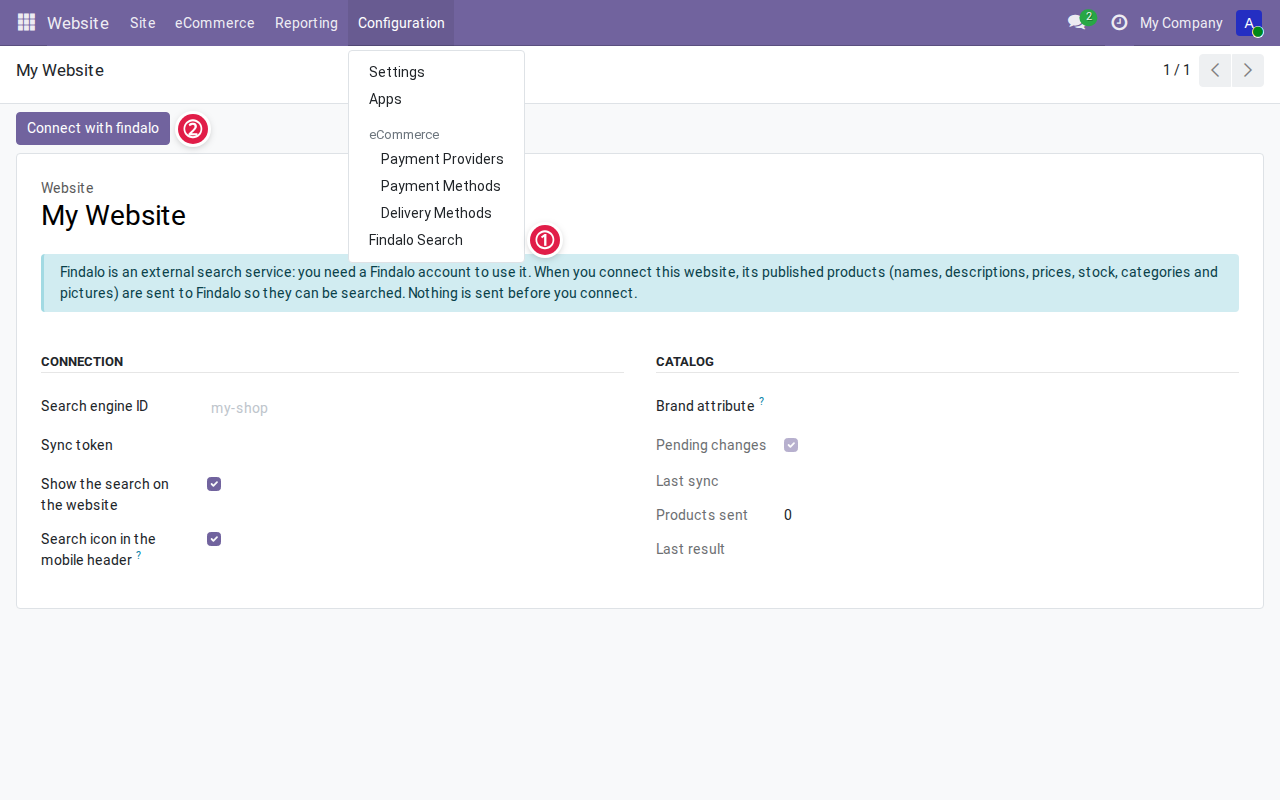
You come back to Odoo with the store already connected: the module sends the catalog and the search icon opens Findalo. There are no tokens to copy; the credential travels server to server. And until you connect, the module sends nothing to Findalo. The whole thing takes about ten minutes, and the steps are explained in more detail in the documentation.
Try it before you install anything
We have a demo store running on a real Odoo 19 install, with the module enabled: odoo.findalo.io. Click the search icon in the header and search for whatever you like, typos included.
What's next: one post per platform
Odoo is the sixth platform with a Findalo integration, alongside PrestaShop, WooCommerce, Magento, Shopify and Shopware. Over the next few weeks we'll publish a post like this one for each of them, saying where we're already in the platform's official extension store and where we aren't yet.
Keep reading
-
Purchase intent: let the search find "the love stone" even if the product page doesn't say so
For every product and in every language, the AI writes the phrases a shopper would use to ask for it: what it's for and what people call it. Real examples from a minerals shop, a medical instruments catalogue in German and a chain of shoe shops. Included from Pro up, with nothing to configure.
-
Free 1-month trial: what's included and what happens when it ends
200 products, 1,000 searches in total and no card. When the month or the searches run out, search stops responding and, if you don't move to a paid plan, the account is deleted 30 days later. What we warn you about, how to continue with Starter or Pro (14-day free trial), and when the trial won't help you decide.