
Search
Synonyms that actually work in Spanish: accents, ñ and Catalan
· 7 min read · By Ray Rodríguez, founder of Findalo
We sell a search engine with semantic AI, so the logical thing would be for us to say synonyms aren't needed any more. They are: they're still needed, and in Spanish more than in other languages.
This post explains why, and which synonyms actually move sales in a Spanish-language store. Not a generic list: the four types that come up again and again when you look at what your customers type.
Why AI doesn't swallow them
Meaning-based search is excellent for the ambiguous: someone types "something for sensitive skin" and finds products containing none of those words. No synonym helps there, and that's where AI wins.
But there are three places where interpretation isn't what you want:
- When the word is exact and you know it. If in your store a "backpack" and a "messenger bag" are different things, you don't want anything blending them because they look alike.
- When the term is yours. The internal name of your range, the abbreviation your industry uses, the code your customers inherited from another supplier. That isn't in any model: it's in your head.
- When you want to be the one deciding. A synonym is a business decision that always holds. Interpretation is a probability that's right nearly always. For the thing that feeds you, you want the first.
The healthy way to see it: AI covers the long tail, synonyms cover what you can't afford to get wrong.
The four types that matter in Spanish
1. What gets typed without accents and without ñ
Plenty of people type without accents on purpose, because it's faster on a phone. And the ñ, on badly configured keyboards or in a hurry, becomes an n.
A decent search engine should already normalise that by itself, and ours does: café and cafe find the same thing, niño and nino too. What's worth doing is checking, not assuming, because it's the most common failure and the quietest: it doesn't produce zero results, it produces worse results.
The test takes ten seconds: search your best seller without accents.
2. The Spanish of over there
If you sell outside Spain, or people buy from outside even though you aren't chasing it, this isn't a detail: it's half your catalogue.
- ordenador · computadora — computer
- móvil · celular — mobile phone
- coche · carro · auto — car
- zumo · jugo — juice
- nevera · heladera · refrigerador — fridge
- patata · papa — potato
- gafas · lentes · anteojos — glasses
- chaqueta · campera · chamarra — jacket
Check your analytics before adding them all: if nobody buys from there, it's noise. And if they do and you didn't know, the list of searches with no results will tell you soon enough.
3. Catalan and Galician inside the same store
This is the case almost nobody addresses, and it's very real: a store whose site is in Spanish and whose customers search in Catalan, or the other way round. It isn't a multilingual store; it's a store where two languages come in through the same search box.
Examples that genuinely show up: ulleres for glasses, sabates for shoes, joguines for toys, llibre for book, ganivet for knife. In Galician, cadeira for chair or vasoira for broom.
You don't need to translate the catalogue. It's enough that the words your customers use lead to your products.
4. What they call it and what you call it
The most profitable of the four, and the only one you can't copy off a list on the internet, because it's yours.
You have "stick vacuum cleaner" and they search "cordless vacuum". You have the manufacturer's trade name and they search for what it's for. You have "S3 safety footwear" and they search "work boots with a toe cap".
This comes from two places: the list of searches with no results, and asking whoever answers the phone at your company, who knows by heart how people ask for things.
The ones you shouldn't create
A badly placed synonym does more damage than a missing one, because it breaks trust in the results.
- Nothing that changes the price or the size. "Pack" and "unit" aren't synonyms. Neither are "5 litres" and "5 kilos".
- Nothing with a negation inside. "Gluten-free" isn't a synonym for "gluten", and yet they look very alike as text.
- Brands you don't carry. Tempting and a bad idea: the customer searches a brand, gets something else, and leaves with the feeling that you slipped something past them.
- Whole categories. If you make "shoes" also find "trainers", you've just turned two precise searches into one imprecise one.
Groups and rules: not the same thing
A small distinction that avoids big messes, and in the dashboard they're two separate things.
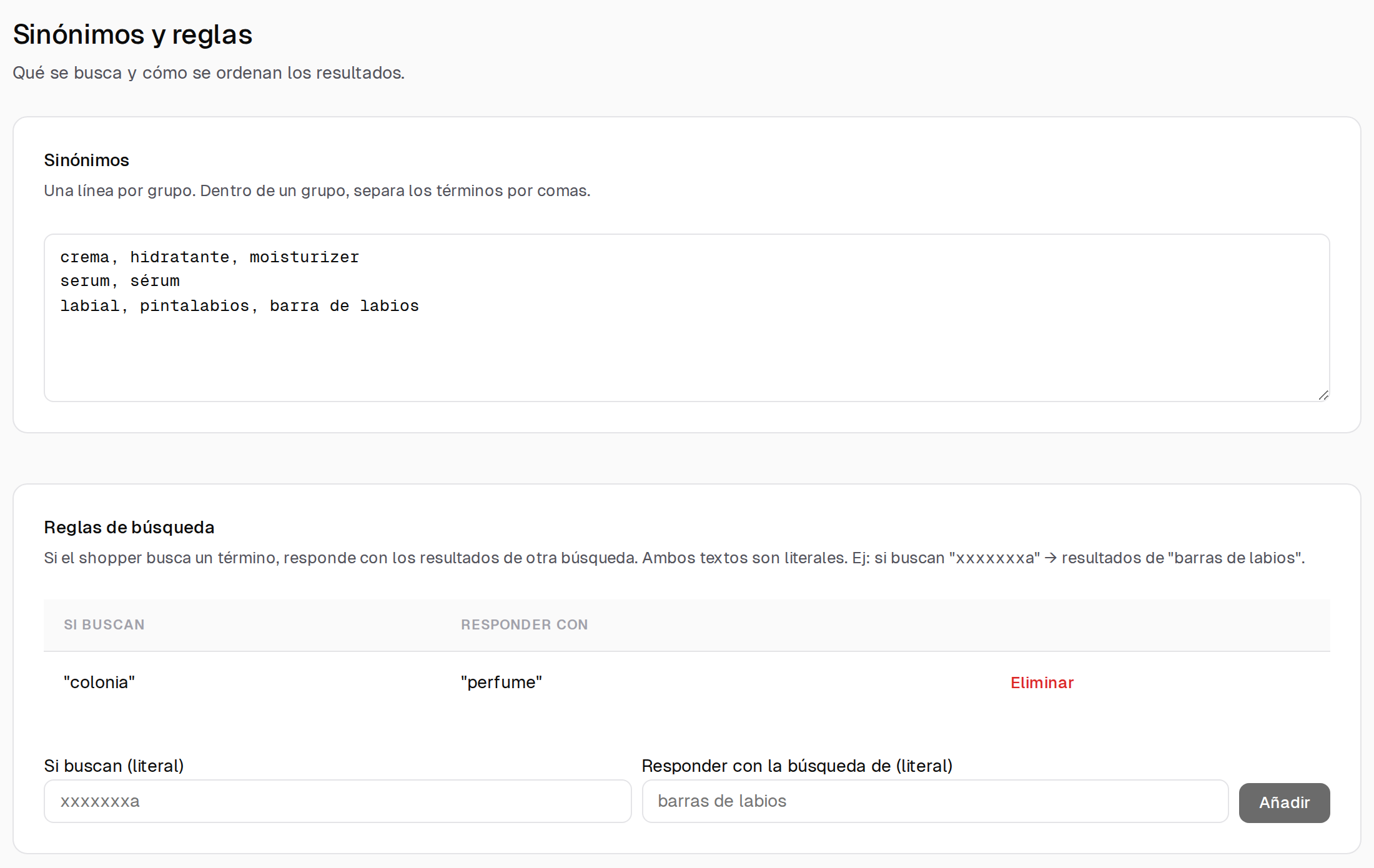
A synonym group is a handful of words that mean the same thing, and it works in every direction: crema, hidratante, moisturizer. Whichever you search, you get the same. You write one line per group, terms separated by commas.
A search rule goes one way only and is literal: if they search one thing, you answer with the results for another. colonia → perfume. It's for exactly what a group would get wrong: when someone searching one word should see another's results, but not the reverse.
Almost every synonym mistake comes from putting into a group something that only went one way.
How to find yours in half an hour
- Open the list of searches with no results. Half the work is done there, and it's already sorted by what's searched most.
- Keep the ones you do stock. If somebody searched for something you don't sell, that isn't a synonym: it's a buying idea.
- Ask customer service. Ten minutes with whoever answers the phone beats a day staring at reports.
- Start with twenty, not two hundred. Synonyms are reviewed by checking whether they improved anything, and two hundred at once can't be evaluated.
In Findalo this lives in the dashboard, under Search → Synonyms and rules, and applies immediately: nothing to rebuild and no waiting for the next sync.
And French isn't fixed by translating this
If your store also sells in French, don't translate this list. There the problem is different: elision (l'huile, d'olive), accents that vary depending on who's typing, and the hyphens in compound words. We cover it in its own post, because it's a different problem and not a version of this one.
Want to see what gets searched in your store and finds nothing? It's in the dashboard from day one, including during the trial month.
Keep reading
-
Purchase intent: let the search find "the love stone" even if the product page doesn't say so
For every product and in every language, the AI writes the phrases a shopper would use to ask for it: what it's for and what people call it. Real examples from a minerals shop, a medical instruments catalogue in German and a chain of shoe shops. Included from Pro up, with nothing to configure.
-
Free 1-month trial: what's included and what happens when it ends
200 products, 1,000 searches in total and no card. When the month or the searches run out, search stops responding and, if you don't move to a paid plan, the account is deleted 30 days later. What we warn you about, how to continue with Starter or Pro (14-day free trial), and when the trial won't help you decide.