
B2B
B2B search: every customer, their own price and their own catalogue
· 8 min read · By Ray Rodríguez, founder of Findalo
If you sell to businesses, it all comes down to one sentence: every customer, their own price and their own catalogue. Their price, because each one has negotiated their own terms. And their catalogue, because they shouldn't be seeing products they're not meant to see.
In a B2B store the search box also has a different job. The professional buyer doesn't browse and doesn't want to be inspired. They know what they want, they type it, and they expect to find it first time.
Most search engines for online stores are built for the other scenario: an anonymous shopper, one catalogue for everyone and a single price. Put one in a wholesaler and the seams show straight away.
This post covers the five things a B2B store actually needs, what Findalo does about each one, and what you need to have in place before you buy it.
1. Searching by SKU, which is how a professional really searches
The buyer in a B2B store doesn't type "stainless steel hex bolt". They type M8X40-DIN933. Or RF-4421-B. Or the manufacturer code printed on the delivery note.
That's where a store's ordinary search breaks, and nearly always for the same reasons:
- The hyphen and the space. The customer types
RF4421Band you have it stored asRF-4421-B. A search engine that splits the word at the hyphen returns anything, or nothing. - Leading zeros.
004421and4421are the same reference to the buyer, and two different strings to the database. - The variant suffix. They search the base reference and want to see every variant of it; or they search the exact variant and don't want to see any other.
- The customer's reference isn't yours. Plenty of professional buyers work with the manufacturer's code, or with their own inherited from their ERP. If you only index your internal reference, they find nothing.
In Findalo, searching by SKU, manufacturer code and EAN works out of the box, tolerates typos and doesn't break on hyphens or separators. It's the same engine that serves text searches, so a buyer can type a reference or a product name interchangeably.
2. Every customer, their own price
If you sell to businesses, the price isn't a number: it's a table. Price tier by group, negotiated terms, volume discounts, different taxes depending on the buyer's country.
Search has to show that customer's price, not the list price. It sounds obvious and it's the most common failure: search engines showing the public price to a wholesaler with 40% negotiated off, and the buyer stops trusting the results the moment they catch it once.
Findalo resolves the price against the store, for the customer logged in at that moment. Every result card shows what that buyer is going to pay, with their tax applied, and in whatever units you sell in — each, box, pallet.
And if the price is already theirs, the catalogue has to be theirs too.
3. And every customer, their own catalogue: they don't see products they're not meant to see
This is the other half of the promise, and the one that really separates a B2B search engine from one that isn't. It doesn't get solved by bolting a filter on top.
In a professional store, two logged-in customers searching for the same thing have no reason to see the same thing. One works with a range the other hasn't been signed up for. One has access to a brand catalogue the other doesn't. And showing someone a product they can't buy isn't a cosmetic detail: it generates a call to your sales rep, or worse, an order that has to be cancelled.
With Findalo, every logged-in customer sees their own catalogue. It isn't a filter the buyer can switch off, nor a visual layer on top of the results: search returns exactly what that person can buy, and what they can't simply isn't there. The counters, the side filters and the result count all add up with what they see, because they're computed over their catalogue, not the general one.
And for catalogues where authorisation is finer-grained than that, there's another level: explicitly defining what each customer sees. That's the option for anyone already managing per-customer authorisations in their ERP who wants search to respect them as they are.
4. Pinning the products you want to come up first
The three things above are about the customer finding what's theirs. This one is about you deciding what they see first when they find it.
In B2B that matters more than in a consumer store, because a lot of searches are generic and you know what the right answer is. A buyer types a size or a product family, and you want your own brand at the top, or the reference you actually have in stock, or the one that replaces something you've discontinued.
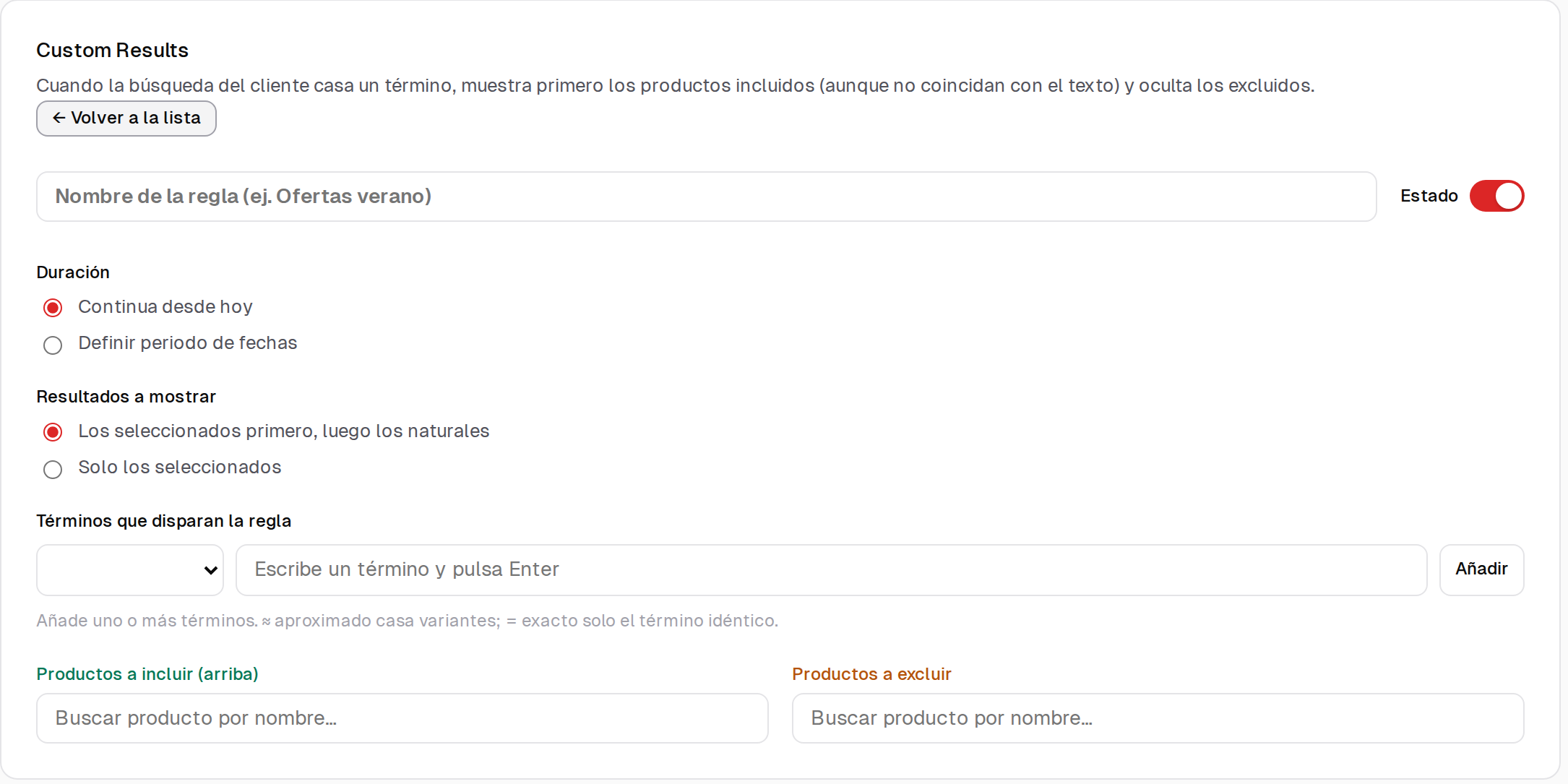
A rule is made of three things:
- The terms that trigger it. You can ask for approximate matching, which catches variants of what the customer types, or exact, which only fires on the identical term.
- The products you push up. They appear first even if they don't match the text being searched. That's what lets you put the replacement for a discontinued reference into the search for the old one.
- The products you take out. For that term they stop appearing.
And you decide whether your picks go ahead of the natural results or whether, for that term, only the ones you've chosen are shown. The second option is the one stores with brand agreements use: some searches are answered with a closed catalogue, not with whatever relevance says.
Rules can run continuously or only for a set period, which is the practical option for a campaign or to cover a stockout while it lasts.
5. And a search tool for your team, separate from the store's
This is the one you don't expect and the one that gets used most day to day.
In a B2B store, the person searching your catalogue most isn't the customer: it's your own people. Whoever picks up the phone and has to say whether a reference is in stock while the customer waits. Whoever's at the counter with the delivery note in front of them. Whoever's picking an order in the warehouse.
Those people usually search through the store's back office today, which is slow and designed for editing products, not finding them. Or through a spreadsheet. Or by asking a colleague.
With B2B you get Findalo Front Search: an internal search tool for your team, with its own login and separate from the store's. Same catalogue and same engine your customers use, but built for working with it:
- It searches by barcode and EAN, as well as by name and reference. Which is what you want at a counter or in a warehouse.
- It can show the barcode image for each product, to check against what's on the box.
- It runs in the browser, with nothing to install and without handing store back-office access to people who shouldn't have it.
And the part that matters most when you're keeping an eye on what you pay: your team's searches don't eat into your plan's quota. The quota you buy is for your customers, and it would feel wrong for us to spend it on your own internal lookups. If you'd rather see everything in one number, it can be switched to count; but out of the box it doesn't.
One honest note: the login is one for the team, not an account per person.
What you need to have in place
Here's the part we'd rather tell you before you buy it than after.
- The search engine has to be able to read your catalogue. With the module installed it usually works without touching anything — there are B2B stores that haven't needed a single line. But if your catalogue sits behind a login wall, Findalo's routes may have to be allowed through, and if they aren't, the sync never starts. It's five minutes of your developer's time, and it shows up on the first sync: it isn't something you find out about three weeks later.
- Groups and price tiers are still your store's business. We don't invent authorisations or prices: we read the ones you already have configured. If a new customer's setup or their pricing is handled by hand, that doesn't change.
- Meaning-based search behaves differently. When the catalogue is scoped per customer, search favours precision over freely interpreting the query. In B2B that's usually what you want: a buyer typing a reference doesn't want us "interpreting" anything.
When you don't need any of this
In case it saves you a meeting:
- If you sell to businesses but with a single price and the same catalogue for everyone, you don't need the B2B part. A normal plan has you covered.
- If your catalogue is under two hundred references and your customers know them by heart, search adds little: a quick order-by-reference form will do more for you.
- If your problem is that your ERP and your store don't talk to each other, search won't fix it. Sort that out first; we read whatever's there.
What it costs
The B2B functionality is €39 a month, added on top of the Pro plan, and it includes the internal search tool for your team. You don't buy it from the panel: you write to us, we look at your case and we switch it on for you — partly because that way we check together that your catalogue comes through properly before anything gets turned on.
If you'd like to see it with your own catalogue before deciding, we'll set up a trial with your products, free and with no commitment. Write to us and we'll take a look.
A real case: Vives de la Cortada (case study, in Spanish) is a minerals wholesaler on PrestaShop 8, with five languages and two audiences sharing the same store — trade and retail. You can see the search engine working there with prices by customer type.
Keep reading
-
Purchase intent: let the search find "the love stone" even if the product page doesn't say so
For every product and in every language, the AI writes the phrases a shopper would use to ask for it: what it's for and what people call it. Real examples from a minerals shop, a medical instruments catalogue in German and a chain of shoe shops. Included from Pro up, with nothing to configure.
-
Free 1-month trial: what's included and what happens when it ends
200 products, 1,000 searches in total and no card. When the month or the searches run out, search stops responding and, if you don't move to a paid plan, the account is deleted 30 days later. What we warn you about, how to continue with Starter or Pro (14-day free trial), and when the trial won't help you decide.